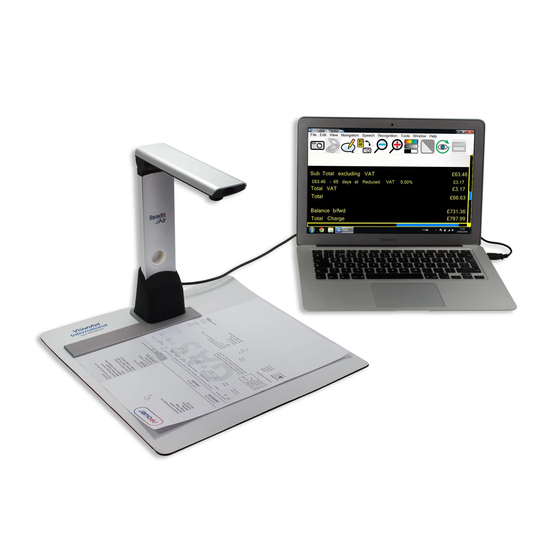

Summary of Contents for VisionAid Readit Air
- Page 1 Hardware Guide Rev A English Copyright (C) 2008-2016, VisionAid International Ltd, all rights reserved.
-
Page 2: Table Of Contents
Box contents ......................4 Positioning Readit Air for use................5 Readit Air contrast/positioning mat ..............5 Unfolding Readit Air camera head and attaching the positioning guide ... 6 Folding Readit Air’s camera head for transport ..........7 Plugging In ......................8 Positioning your documents for capture ............. -
Page 3: Introduction
Introduction Congratulations on choosing the Readit Air digital capture reading system. The Readit Air combines high speed OCR, speech and reformatted text output with ease of use and portability. It can capture and read any printed material such as letters, bank statements, newspapers, food packaging etc. and weighs just 500 grams (1.1 lbs). -
Page 4: Ownership And Intellectual Property
Copyright (C) 2009, Willow Garage Inc., all rights reserved. Third party copyrights are property of their respective owners. Box contents Your Readit Air box should contain the following items: 1. Readit Air portable digital capture reading system. 2. Drawstring bag for Readit Air. -
Page 5: Positioning Readit Air For Use
Readit Air also includes a contrast/positioning mat. This can be used if the surface where you wish to place the Readit Air is very dark and the item wishing to be read is small (e.g. a postage receipt, business card etc.). -
Page 6: Unfolding Readit Air Camera Head And Attaching The Positioning Guide
VisionAid International Ltd Unfolding Readit Air camera head and attaching the positioning guide Getting Readit Air ready for use takes just a few seconds and two easy steps 2. Unfold the camera head of 1. Lower the Readit Air camera... -
Page 7: Folding Readit Air's Camera Head For Transport
VisionAid International Ltd Folding Readit Air’s camera head for transport To fold Readit Air for transport, simply do the exact opposite of the unfolding procedure before placing the Readit Air into its drawstring bag with the included right-angled USB cable. -
Page 8: Plugging In
VisionAid International Ltd Plugging In Readit Air has a relatively short attachable USB cable included. This is designed to be used in conjunction with laptops. A USB extension lead is also provided for desktop PC use. At the end of the USB cable is the USB connector that needs inserting into one of your computer’s USB ports. -
Page 9: Positioning Your Documents For Capture
Readit Air captures an area slightly larger than an A4 or Letter page. Documents must be in a landscape orientation with the long edge of the document going left to right when the Readit Air camera head is facing towards you. -
Page 10: Headphones
VisionAid International Ltd Headphones Readit Air includes a pair of over ear headphones with in-line volume control. They have a standard 3.5 mm audio jack connector. To use the headphones, (or any other that you may already own), simply plug them into the headphone socket on your PC or laptop. -
Page 11: Appendix A: Safety
Contact your VisionAid International distributor to service this equipment if necessary. Do not open or remove any parts of the Readit Air as it will void the warranty. Do not expose the Readit Air to excessive heat or direct sunlight.
Need help?
Do you have a question about the Readit Air and is the answer not in the manual?
Questions and answers