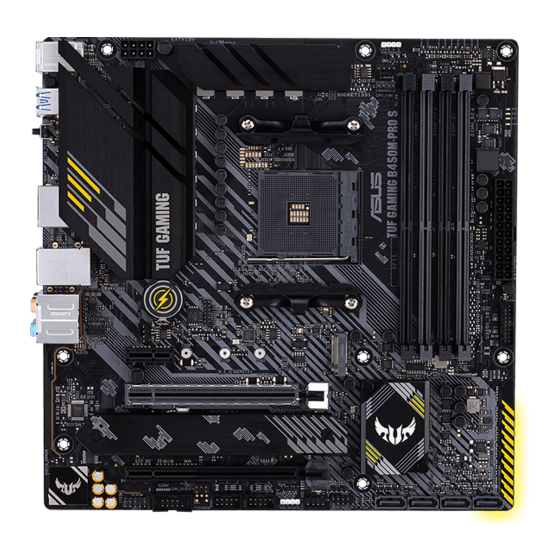
Asus TUF GAMING B450M-PRO S Instruction Manual
Hide thumbs
Also See for TUF GAMING B450M-PRO S:
- Quick start manual (2 pages) ,
- Manual (29 pages) ,
- Quick start manual (2 pages)
Table of Contents
Advertisement
Advertisement
Table of Contents

Related Manuals for Asus TUF GAMING B450M-PRO S


Summary of Contents for Asus TUF GAMING B450M-PRO S
- Page 1 TUF GAMING B450M-PRO S...
- Page 2 Product warranty or service will not be extended if: (1) the product is repaired, modified or altered, unless such repair, modification of alteration is authorized in writing by ASUS; or (2) the serial number of the product is defaced or missing.
-
Page 3: Table Of Contents
Contents Safety information ...................... iv About this guide ......................v Package contents ....................... vi TUF GAMING B450M-PRO S specifications summary ..........vi Connectors with shared bandwidth ................x Chapter 1 Product introduction Before you proceed ..................1-1 Motherboard overview ................. 1-1 Central Processing Unit (CPU) .............. -
Page 4: Safety Information
Safety information Electrical safety • To prevent electrical shock hazard, disconnect the power cable from the electrical outlet before relocating the system. • When adding or removing devices to or from the system, ensure that the power cables for the devices are unplugged before the signal cables are connected. If possible, disconnect all power cables from the existing system before you add a device. -
Page 5: About This Guide
Refer to the following sources for additional information and for product and software updates. ASUS website The ASUS website provides updated information on ASUS hardware and software products. Refer to the ASUS contact information. Optional documentation Your product package may include optional documentation, such as warranty flyers, that may have been added by your dealer. -
Page 6: Package Contents
Memory Dual Channel Memory Architecture *ECC Memory (ECC mode) support varies by CPU. *Refer to www.asus.com for the Memory QVL (Qualified Vendors Lists). Integrated Graphics in the 2 Gen AMD Ryzen™ with Radeon™ Vega Graphics/ Athlon™ with Radeon™ Vega Graphics Processors 1 x DisplayPort 1.2... - Page 7 TUF GAMING B450M-PRO S specifications summary Total supports 2 x M.2 slots and 4 x SATA 6Gb/s ports Gen AMD Ryzen™/ 2 and 1 Gen AMD Ryzen™ with Radeon™ Vega Graphics 1 x M.2_1 slot (Key M), type 2242/2260/2280 (supports PCIe 3.0 x4 &...
- Page 8 - ASUS Overvoltage Protection - ASUS SafeSlot - ASUS Stainless-Steel Back I/O ASUS Q-Design - ASUS Q-DIMM - ASUS Q-LED (CPU [red], DRAM [yellow], VGA [white], Boot Device Special Features [yellow green]) - ASUS Q-Slot ASUS Thermal Solution - Aluminum heatsink design ASUS EZ DIY - BIOS FlashBack™...
- Page 9 * To support Windows 7 64-bit, please install an AMD Ryzen™ 2 Generation or Ryzen™ 1 Generation Processor. mATX Form Factor Form Factor 9.6 inch x 9.6 inch (24.4 cm x 24.4 cm) Specifications are subject to change without notice. Refer to the ASUS website for the latest specifications.
-
Page 10: Connectors With Shared Bandwidth
Connectors with shared bandwidth RGB_HEADER1 KBMS _USB78 EATX12V CPU_OPT DIGI+ CPU_FAN U32G1_3-6 BOOT DRAM BIOS_FLBK FLBK_LED1 HDMI_DP U32G2_C2 LAN_U32G2_1 8125B-CG BATTERY AUDIO 256Mb BIOS SPI TPM PCIEX1 2280 2260 2242 PCIEX16_1 Super B450 22110 2280 2260 2242 CLRTC PCIEX16_2 SPEAKER RGB_HEADER2 COM_DEBUG USB910... -
Page 11: Chapter 1 Product Introduction
RGB_HEADER2 SPEAKER COM_DEBUG USB910 USB1112 SATA6G_4 SATA6G_3 SATA6G_2 SATA6G_1 CHA_FAN2 AAFP F_PANEL Unplug the power cord before installing or removing the motherboard. Failure to do so can cause you physical injury and damage motherboard components. ASUS TUF GAMING B450M-PRO S... - Page 12 1.2.1 Layout contents 1. CPU socket The motherboard comes with an AMD Socket AM4 designed for 3 Gen AMD Ryzen™/2 Gen AMD Ryzen™ with Radeon™ Vega Graphics/ Athlon™ with Radeon™ Vega Graphics Processors. For more details, refer to Central Processing Unit (CPU). 2.
- Page 13 10. AURA RGB headers The RGB headers allow you to connect RGB LED strips. The RGB headers support 5050 RGB multi-color LED strips (12V/G/R/B), with a maximum power rating of 3A (12V), and no longer than 3 m. ASUS TUF GAMING B450M-PRO S...
- Page 14 Before you install or remove any component, ensure that the ATX power supply is switched off or the power cord is detached from the power supply. Failure to do so may cause severe damage to the motherboard, peripherals, or components. •...
- Page 15 The actual cause may vary from case to case. 18. BIOS FlashBack The FlashBack™ LED lights up or blinks to indicate the status of the BIOS FlashBack™. Scan the QR code for more information on BIOS FlashBack function. ASUS TUF GAMING B450M-PRO S...
- Page 16 1.2.2 Rear panel connectors PS/2 keyboard/mouse combo port. This port is for a PS/2 mouse or keyboard. USB 3.2 Gen 1 (up to 5Gbps) ports. These 9-pin Universal Serial Bus (USB) ports connect to USB 3.2 Gen 1 devices. USB 3.2 Gen 1 (up to 5Gbps) port with BIOS FlashBack function.
- Page 17 Line Out Front Speaker Out Front Speaker Out Front Speaker Out Pink Mic In Mic In Mic In Mic In Orange – – Center/Subwoofer Center/Subwoofer Black – Rear Speaker Out Rear Speaker Out Rear Speaker Out ASUS TUF GAMING B450M-PRO S...
-
Page 18: Central Processing Unit (Cpu)
Central Processing Unit (CPU) This motherboard comes with an AMD Socket AM4 designed for 3 Gen AMD Ryzen™/2 Gen AMD Ryzen™ with Radeon™ Vega Graphics/ Athlon™ with Radeon™ Vega Graphics Processors. Unplug all power cables before installing the CPU. The AM4 socket has a different pinout design. Ensure that you use a CPU designed for the AM4 socket. -
Page 19: System Memory
• For system stability, use a more efficient memory cooling system to support a full memory load. • Refer to www.asus.com for the latest Memory QVL (Qualified Vendors Lists). Recommended memory configurations DIMM_A1 DIMM_A2* DIMM_A2*... -
Page 20: M.2 Installation
Installing a DIMM To remove a DIMM M.2 installation OPTIONAL • Ensure to install the bundled M.2 rubber pad before installing your single sided M.2 storage device. • DO NOT install the bundled M.2 rubber pads when installing a double-sided M.2 storage device. -
Page 21: Chapter 2 Bios And Raid Support
BIOS and RAID Support Knowing BIOS The new ASUS UEFI BIOS is a Unified Extensible Interface that complies with UEFI architecture, offering a user-friendly interface that goes beyond the traditional keyboard- only BIOS controls to enable a more flexible and convenient mouse input. You can easily navigate the new UEFI BIOS with the same smoothness as your operating system. -
Page 22: Bios Setup Program
BIOS Setup program Use the BIOS Setup to update the BIOS or configure its parameters. The BIOS screens include navigation keys and brief onscreen help to guide you in using the BIOS Setup program. Entering BIOS at startup To enter BIOS Setup at startup, press <Delete> or <F2> during the Power-On Self Test (POST). -
Page 23: Asus Ez Flash 3
ASUS EZ Flash 3 The ASUS EZ Flash 3 feature allows you to update the BIOS without using an OS-based utility. Ensure to load the BIOS default settings to ensure system compatibility and stability. Select the Load Optimized Defaults item under the Exit menu or press hotkey <F5>. -
Page 24: Asus Crashfree Bios 3
The BIOS file in the motherboard support DVD may be older than the BIOS file published on the ASUS official website. If you want to use the newer BIOS file, download the file at https://www.asus.com/support/ and save it to a USB flash drive. -
Page 25: Raid Configurations
For more information on configuring your RAID sets, please refer to the RAID Configuration Guide which you can find at https://www.asus.com/support, or by scanning the QR code. RAID definitions RAID 0 (Data striping) optimizes two identical hard disk drives to read and write data in parallel, interleaved stacks. - Page 26 Chapter 2: BIOS and RAID Support...
-
Page 27: Appendix
- Increase the separation between the equipment and receiver. - Connect the equipment into an outlet on a circuit different from that to which the receiver is connected. - Consult the dealer or an experienced radio/TV technician for help. ASUS TUF GAMING B450M-PRO S... - Page 28 Compliance Statement of Innovation, Science and Economic Development Canada (ISED) This device complies with Innovation, Science and Economic Development Canada licence exempt RSS standard(s). Operation is subject to the following two conditions: (1) this device may not cause interference, and (2) this device must accept any interference, including interference that may cause undesired operation of the device.
- Page 29 ASUS products sold in Vietnam, on or after September 23, 2011,meet the requirements of the Vietnam Circular 30/2011/TT-BCT. Các sản phẩm ASUS bán tại Việt Nam, vào ngày 23 tháng 9 năm2011 trở về sau, đều phải đáp ứng các yêu cầu của Thông tư 30/2011/TT-BCT của Việt Nam.
- Page 30 ASUS Recycling/Takeback Services ASUS recycling and takeback programs come from our commitment to the highest standards for protecting our environment. We believe in providing solutions for you to be able to responsibly recycle our products, batteries, other components as well as the packaging materials.
- Page 31 Директив. Повний текст декларації відповідності стандартам ЄС доступний s bitnim zahtjevima i ostalim odgovarajućim odredbama vezanih direktiva. на: www.asus.com/support Cijeli tekst EU izjave o sukladnosti dostupan je na: www.asus.com/support Türkçe AsusTek Computer Inc., bu aygıtın temel gereksinimlerle ve ilişkili Čeština Společnost ASUSTeK Computer Inc. tímto prohlašuje, že Yönergelerin diğer ilgili koşullarıyla uyumlu olduğunu beyan eder.
-
Page 32: Asus Contact Information
+1-510-739-3777 +1-510-608-4555 Web site https://www.asus.com/us/ Technical Support Support fax +1-812-284-0883 Telephone +1-812-282-2787 Online support https://qr.asus.com/techserv ASUS COMPUTER GmbH (Germany and Austria) Address Harkortstrasse 21-23, 40880 Ratingen, Germany Web site https://www.asus.com/de Online contact https://www.asus.com/support/Product/ContactUs/ Services/questionform/?lang=de-de Technical Support Telephone (DE) +49-2102-5789557 Telephone (AT)
Need help?
Do you have a question about the TUF GAMING B450M-PRO S and is the answer not in the manual?
Questions and answers